Skip to content

Flat plan in. Walkable home out.

Upload a PNG, JPG or PDF and check the walls, doors, windows and rooms Floorplan finds. Or bring an IFC model from Revit or ArchiCAD. Then furnish the home, walk it in 3D or in VR, and share a link.

Free to start, with 5 projects, share links and 10 assistant requests a day.

Check what was found before it becomes a home

  1. Upload

    Drop in a PNG, JPG or PDF plan of up to 20 MB. For a PDF, the first page is used. Have a BIM model? Sign in and upload an IFC file instead.

  2. Review

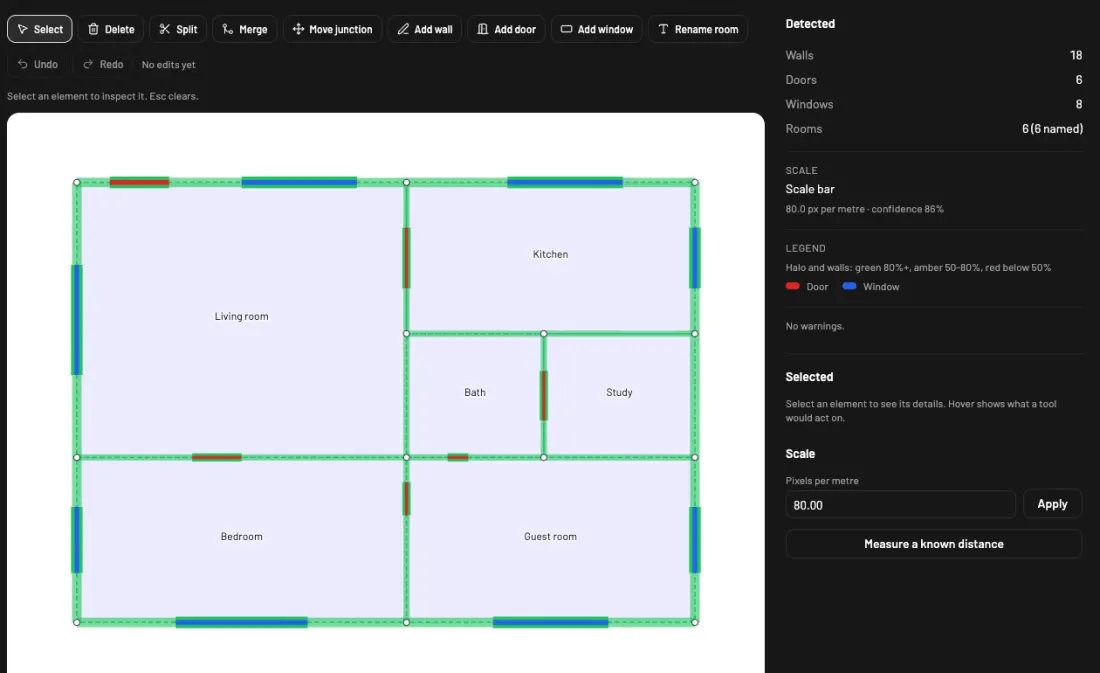
    See the walls, doors, windows and rooms that were found, with their confidence. Set the scale by clicking two points with a known distance.

  3. Walk through

    Open the project in 3D and move through the home. Edit anything in the full editor, then share a view-only link.

The import review screen: a six-room plan with detected walls, doors and windows outlined, and counts of walls, doors, windows and rooms beside it.

Furnish it, walk it, show it

Available

Name a style. The assistant furnishes the room.

Ask for Scandinavian, Japandi, Industrial and other styles. The assistant places pieces from the catalog, and you can undo the whole step.

  • Changes wall and floor finishes
  • Estimates cost and measures
  • Takes the style from a photo
  • Up to 10 requests a day on every plan. A photo counts as one request.
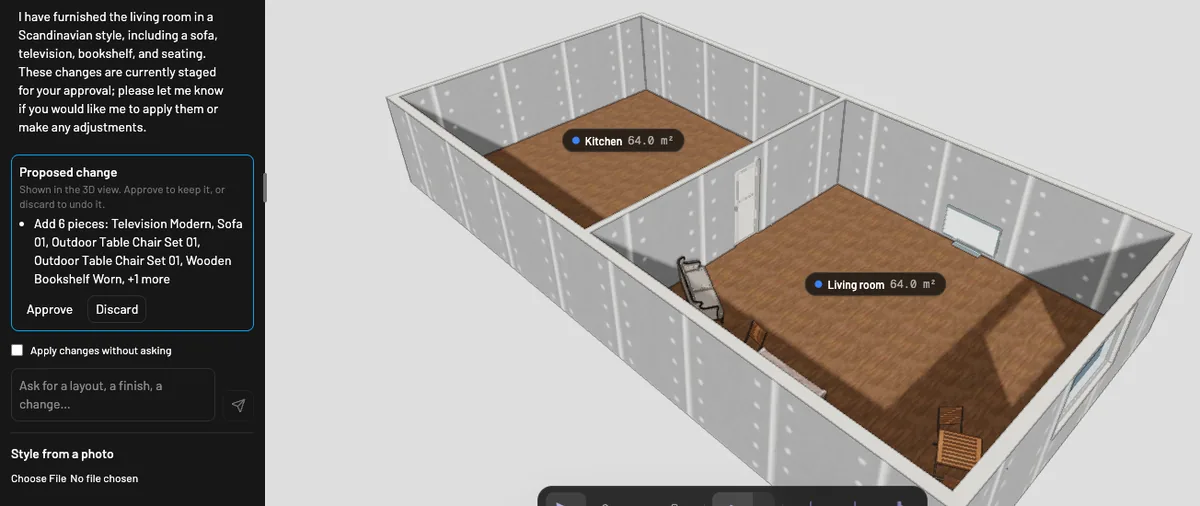
The assistant panel with a Proposed change card listing six furniture pieces and Approve and Discard buttons, beside the two-room 3D model.
Available

AI that asks before it changes anything

The assistant shows each change as a card first. You see it in the 3D view, then press Approve to keep it or Discard to drop it.

  • Add or move a wall, add doors and windows, set the ceiling height
  • Furnish rooms, change finishes, estimate cost and measure
  • Switch on auto-apply if you would rather skip the card
  • Up to 10 requests a day on every plan
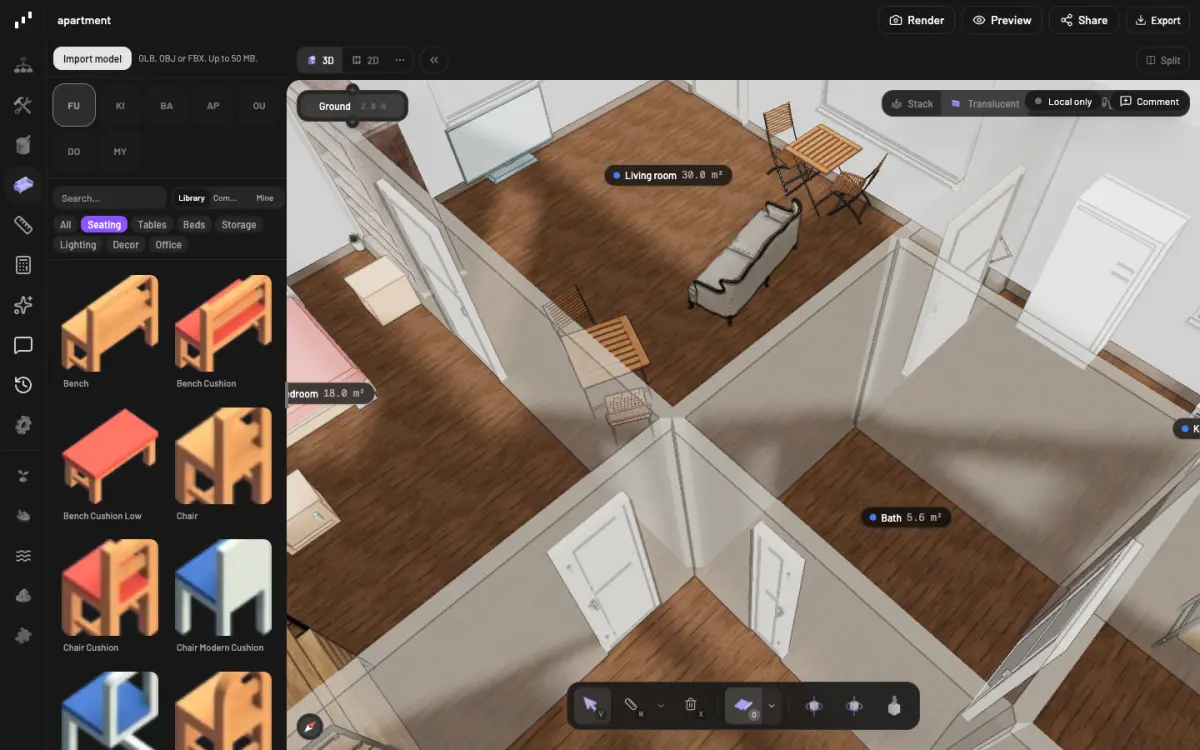
The furniture catalog beside a furnished 3D apartment, filtered to seating.
Available

About 300 free models to place

Browse seating, tables, beds, storage, lighting and decor, or upload your own GLB, OBJ or FBX file.

  • Lamps switch on and off
  • A ceiling fan spins
  • CC0 models from Poly Haven and Kenney
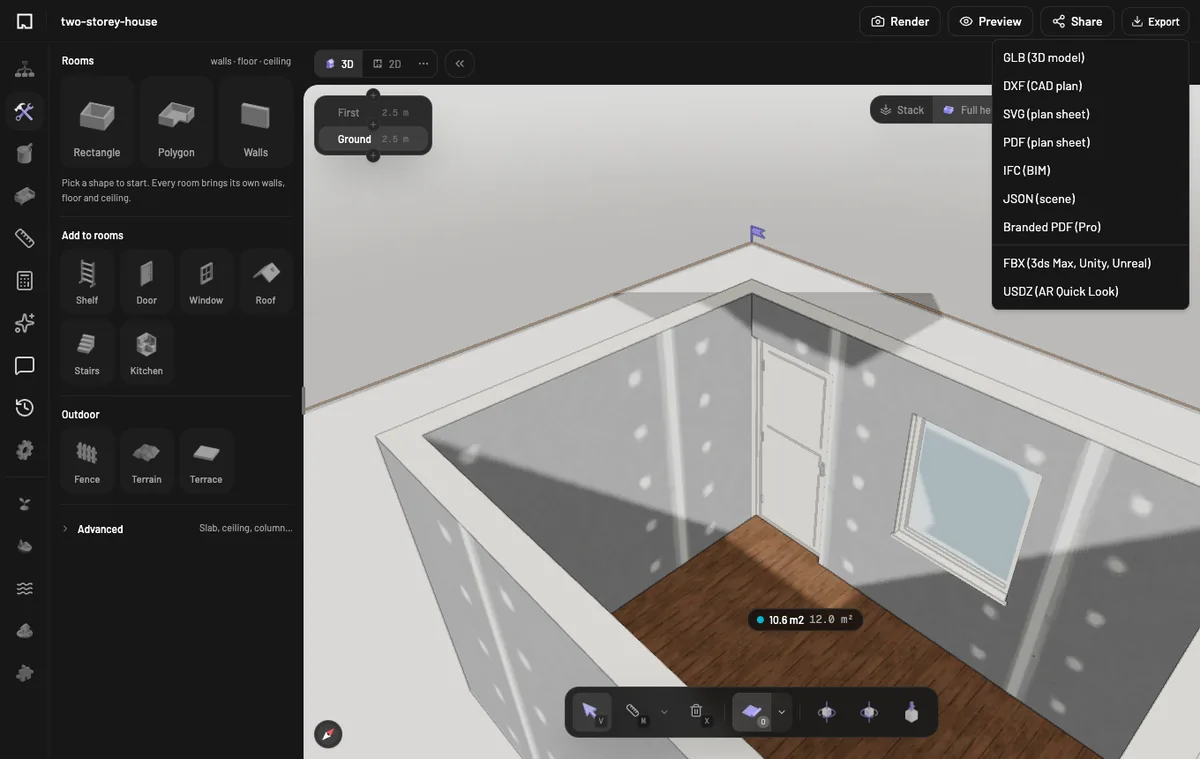
An imported IFC house open in the 3D editor, with the Export menu listing GLB, DXF, SVG, PDF, IFC, JSON, FBX and USDZ.
Available

Bring your BIM model

Upload an IFC file from Revit, ArchiCAD or any BIM tool. It opens as a 3D project you can edit, share and walk through. Sign in to import.

  • Walls, doors, windows, floors, rooms, columns and stairs come in
  • Export IFC and DXF, or FBX for 3ds Max, Unity and Unreal
  • FBX keeps geometry, materials, textures and metric scale
  • IFC, DXF and FBX export are on Plus and Pro, which are not on sale yet
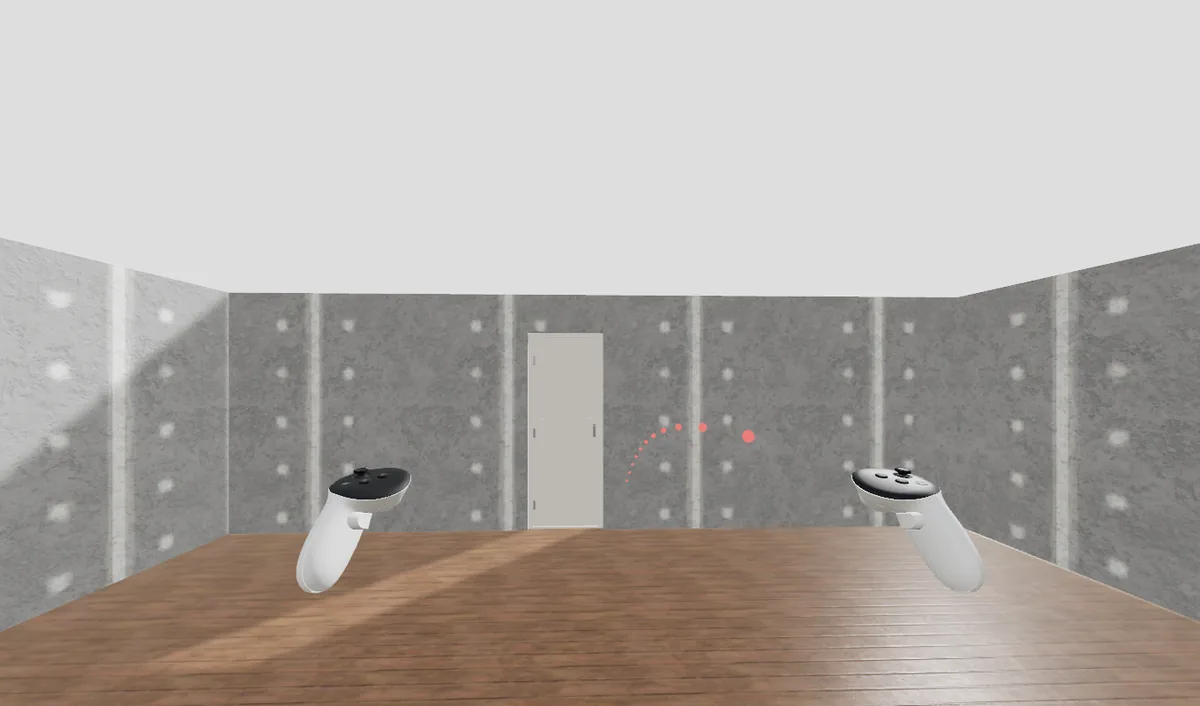
An emulated Meta Quest view inside a room, with two controllers, a door ahead and a teleport arc on the wall.
Available

Walk it in VR

Open a share link or an embed in the browser on a Meta Quest or an Apple Vision Pro and step inside. Clients can walk a home in a headset.

  • Walk with the thumbstick, or teleport to any spot on the floor
  • Walls stop you, so you stay inside the home
  • Works from the share link and the embed
  • Tested in an emulator so far, not yet on a real headset
Available

Renders and walkthrough video

Make a still image, a 360° panorama or an MP4 walkthrough from the same project, and send it to a client who will not open an app.

  • Preview stills on the free plan
  • 1080p and 4K stills on Plus and Pro
  • 360° panoramas on Pro
  • Video: 5 a month at 720p on Plus, 30 a month at 1080p on Pro. Paid plans are not on sale yet.
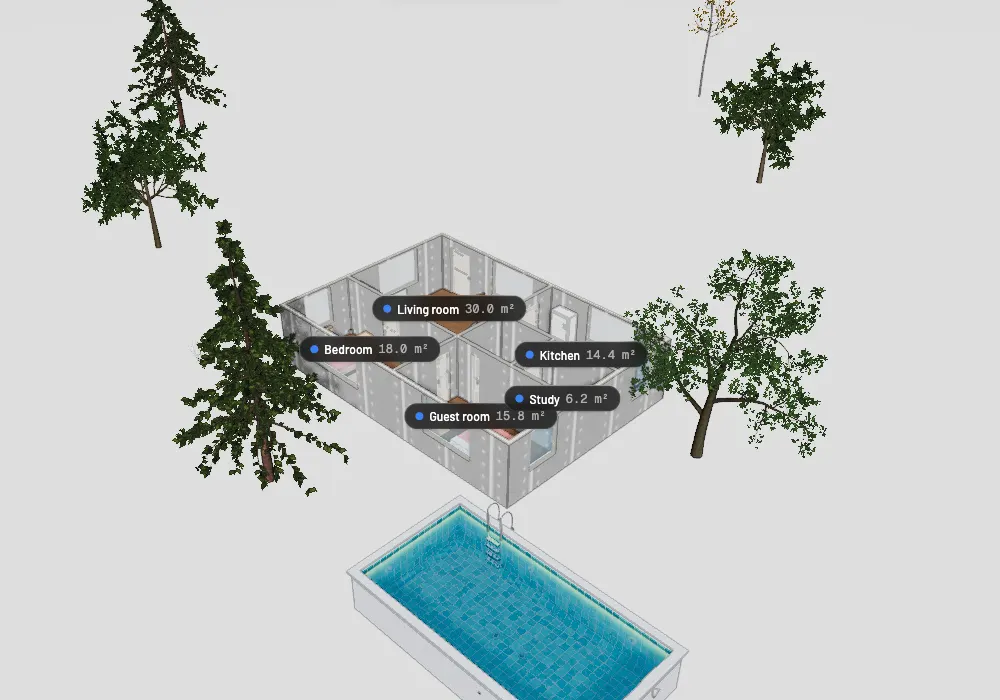
A furnished apartment seen from above, with pine and oak trees around it and a swimming pool in front.
Available

Plan the garden around the house

Outdoor plugins add what surrounds the home, in the same project as the rooms.

  • Trees and plants
  • Terrain and water
  • Pools
  • Streetscape

Use cases

What you can use today, and what comes next

  • Available

    Import from PNG, JPG or PDF

    Drop in a scan, a screenshot or a PDF export. Files up to 20 MB.

  • Available

    IFC import from BIM tools

    Upload an .ifc file from Revit, ArchiCAD or any BIM tool. Walls, doors, windows, floors, rooms, columns and stairs open as a 3D project. Sign in to import.

  • Available

    Review before you build

    Check what was found and set the scale before the project opens. Anything missing can be fixed in the editor.

  • Available

    3D walkthrough

    Walk through the home in 3D, from the same project you edit.

  • Available

    VR walkthrough in the browser

    Walk a home on a Meta Quest or an Apple Vision Pro, from a share link or an embed. Tested in an emulator, not yet on a real headset.

  • Available

    Full editor

    Change the plan after import in the same editor that drives the 3D view. Add trees, terrain, water, pools and streets around the home.

  • Available

    Furniture catalog

    Place about 300 free models from Poly Haven and Kenney, or upload your own GLB, OBJ or FBX file. Lamps switch on and off.

  • Available

    AI assistant with approval

    Ask it to furnish a room, change finishes, add or move a wall, add doors and windows, set the ceiling height, estimate cost or measure. It shows each change first, and you Approve or Discard. Up to 10 requests a day on every plan.

  • Available

    Renders and walkthrough video

    Preview stills, 1080p and 4K renders, 360° panoramas and an MP4 walkthrough video. What you get depends on the plan.

  • Available

    Share links and a public gallery

    Send a view-only link to any project, or list a project in the public gallery. Version history is free for now.

  • Available

    Export

    Download GLB, SVG or JSON on every plan, or USDZ for AR on an iPhone. DXF, IFC, PDF and FBX for 3ds Max, Unity and Unreal come with Plus and Pro, which are not on sale yet. Branded PDF is on Pro.

  • Available

    Phone and plan photos

    The web app works on a phone. Photograph a paper plan and import it from the camera page.

  • Coming soon

    Real-time collaboration

    Edit the same project with other people at once.

  • Coming soon

    iOS and Android apps

    Native apps. Until then, use the web app on your phone.

  • Coming soon

    Public API

    Create and read projects from your own tools.

  • Coming soon

    DXF import

    Start a project from a CAD drawing. DXF export is already on Plus and Pro.

Compared with Planner 5D

Planner 5D compared with Floorplan, by feature. Each Floorplan item is marked Available or Coming soon.
AreaPlanner 5DFloorplan
AI importPremium feature
  • AvailableDetects walls, doors, windows and rooms, then asks you to review them
Input formatsImage files
  • AvailablePNG, JPG and PDF (first page of a PDF)
  • AvailableIFC from Revit, ArchiCAD and other BIM tools (sign in)
  • Coming soonDXF import
2D editorMature, proprietary editor
  • AvailableFull editor for the same project as the 3D view
3D viewerWebGL viewer, flat lighting on the free plan
  • Available3D walkthrough of every project
  • AvailableVR walkthrough in the browser on Quest and Vision Pro, tested in an emulator
  • Coming soonAdvanced lighting presets
RendersStandard renders on Premium, 4K on Pro
  • AvailablePreview stills on Free, 1080p and 4K on Plus and Pro, 360° panoramas on Pro
  • AvailableMP4 walkthrough video on Plus and Pro
Furniture catalog10K+ items, about half behind a paywall
  • AvailableAbout 300 free CC0 models, plus the built-in editor items
  • AvailableUpload your own GLB, OBJ or FBX models
AI designAI room design and automatic furniture arrangement
  • AvailableAI assistant that furnishes a room, changes finishes, adds and moves walls, adds doors and windows, sets ceiling height, estimates cost and measures. On every plan, up to 10 requests a day
  • AvailableShows each change first. You Approve or Discard
  • AvailableStyle from a photo
CollaborationCollaboration tool, paid
  • AvailableVersion history
  • Coming soonReal-time collaboration
PlatformsWeb, iOS, Android, macOS, Windows and visionOS
  • AvailableWeb app that works on phones, with a camera page for paper plans
  • Coming sooniOS and Android apps
ExportLimited
  • AvailableGLB, SVG and JSON export, plus USDZ for AR
  • AvailableDXF, IFC, PDF and FBX (3ds Max, Unity, Unreal) on Plus and Pro, which are not on sale yet
APIAPI integration and product configurator
  • Coming soonPublic API
PriceFree, Premium €4.99/month, Pro €33.33/month
  • AvailableFree
  • Coming soonPlus €6/month, Pro €19/month

Planner 5D details as of 12 October 2026. Competitors change their plans and features often, so check their site before you decide.

Pricing

Importing a plan is part of every plan. Paid plans add projects, exports, more assistant requests and renders, and are not on sale yet.

  • Free

    €0to start

    Import plans, build projects and share them by link.

    • Plan imports with a review step, and IFC import
    • 5 projects
    • Full editor, 3D walkthrough and VR in the browser
    • Share links
    • Furniture catalog
    • AI assistant with approval, 10 requests a day
    • Preview renders
    • GLB, SVG and JSON export
    • Version history
    Import a floor plan
  • Plus

    €6per month

    For people who work on more plans than the free allowance covers.

    • Unlimited projects
    • DXF, IFC and PDF export
    • FBX export for 3ds Max, Unity and Unreal
    • 1080p renders
    • 10 4K renders a month
    • 5 walkthrough videos a month at 720p

    Coming soonCheckout is not open yet. Start on Free today.

  • Pro

    €19per month

    For heavy use: the highest render quality and team features as they ship.

    • Unlimited 4K renders
    • 360° panoramas
    • 30 walkthrough videos a month at 1080p
    • Branded PDF
    • Coming soonReal-time collaboration

    Coming soonCheckout is not open yet. Start on Free today.

Items marked Coming soon are not available yet. Prices are in euros.

Start with the plan you already have.

Import a plan or an IFC model, check what was found, and walk through it in 3D or in VR. The free plan includes imports, 5 projects, share links and 10 assistant requests a day.

Import a floor plan